
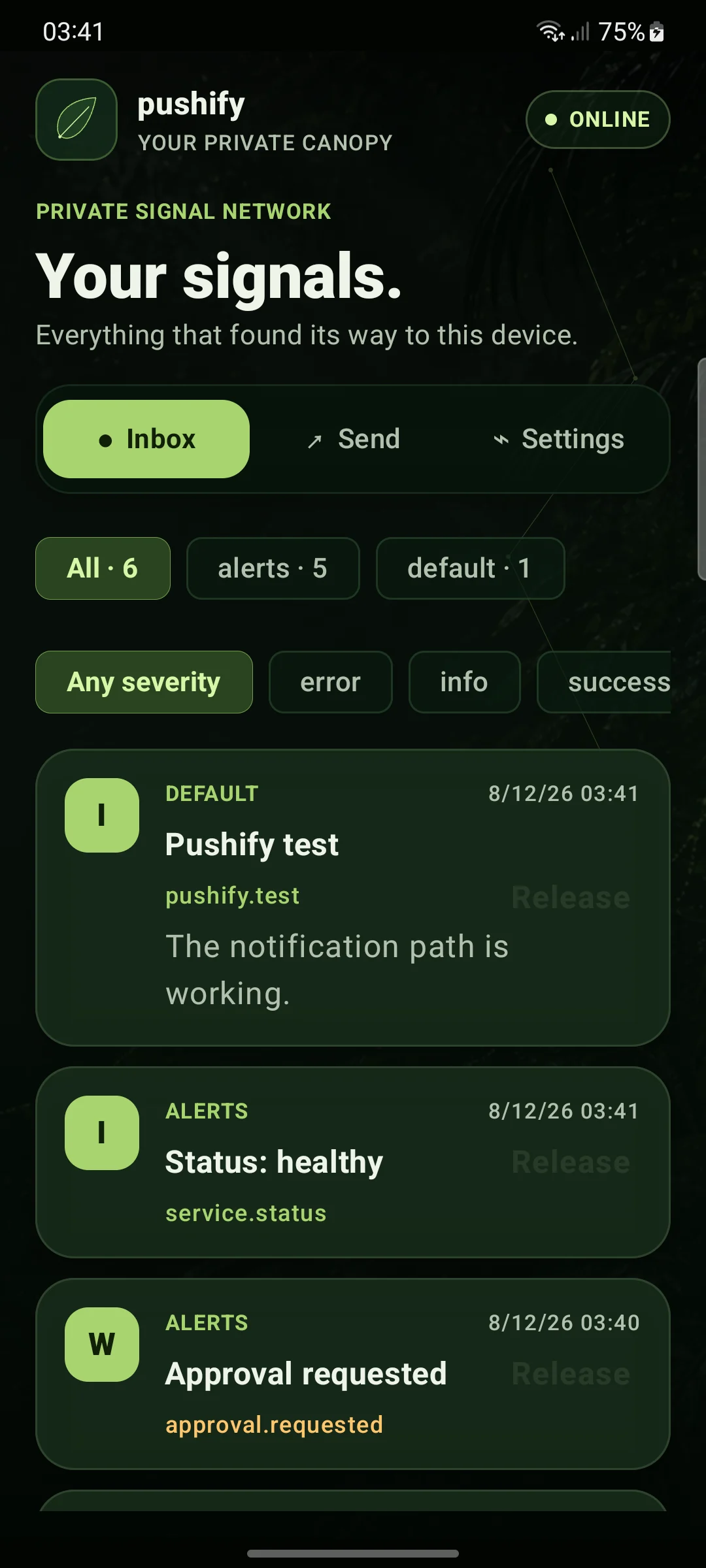
My server alerts had an annoying habit of stopping one step too early. A message would reach my phone, tell me that something needed attention, and then leave me looking for a computer.
Sending the message was never the hard part. I already had scripts for that. What I was missing was the rest of the conversation. Which service sent it? Had a retry created the same alert twice? What did a listener miss while it was offline? And if the server only needed a yes, no, or “show me the status,” why did I need to open a terminal?
That became Pushify: a Go API, a SQLite event store, an Android app, a replayable feed for Linux services, and a small web interface. Firebase Cloud Messaging gets events onto Android, but it is only a delivery path. SQLite holds the actual history.
I use it for server events, but I did not want to build an operations product that was strangely incapable of sending “I’m on my way.” A Pushify event can be a title and nothing more. The structure is there when a script needs it.
Store first, deliver second
Every sender and consumer deals with the same event. The API validates a request, assigns an ID and an increasing sequence number, stores the event and its recipients, and only then attempts delivery.
That order matters. A temporary Firebase failure should not decide whether an event exists. Android keeps a local inbox, and a Linux listener can ask the server for every retained event after the last sequence it handled.
The smallest useful request is still small:
curl --fail-with-body "$PUSHIFY_URL/api/v1/push" \
  -H "Authorization: Bearer $PUBLISH_TOKEN" \
  -H 'Content-Type: application/json' \
  --data '{"title":"Backup finished"}'
An automated sender can attach more context without changing the basic model:
{
  "title": "Deploy complete",
  "body": "The new release is healthy.",
  "channel": "deploys",
  "type": "deploy.completed",
  "severity": "success",
  "data": { "revision": "abc123" },
  "dedupe_key": "deploy-abc123",
  "ttl_seconds": 3600,
  "correlation_id": "release-42"
}
Old title-only senders do not need to care about any of those fields. I like schemas, but sending a notification should not require a schema design meeting.
Retries should not create new events
Imagine that a request reaches Pushify and the response disappears on the way back. The sender cannot know whether the event was stored. Retrying is the sensible thing to do, but two phone notifications would be irritating. If a listener reacts to the event, doing the work twice could be worse.
Pushify scopes each dedupe_key to the authenticated publisher. A retry from the same publisher returns the original event. Another publisher may use the same key without colliding with it.
The lookup and insert happen in one SQLite transaction:
func (s *Store) CreateEvent(ctx context.Context, event Event, principal string) (Event, bool, error) {
    tx, err := s.database.BeginTx(ctx, nil)
    if err != nil {
        return Event{}, false, err
    }
    defer tx.Rollback()

    if event.DedupeKey != "" {
        existing, found, err := eventForDedupe(ctx, tx, principal, event.DedupeKey)
        if err != nil {
            return Event{}, false, err
        }
        if found {
            return existing, true, tx.Commit()
        }
    }

    event.Sequence, err = insertEvent(ctx, tx, event)
    if err != nil {
        return Event{}, false, err
    }
    if event.DedupeKey != "" {
        if err := insertDedupeRecord(ctx, tx, principal, event); err != nil {
            return Event{}, false, err
        }
    }
    return event, false, tx.Commit()
}
The database has a unique constraint as the final referee. One of the tests starts twelve concurrent creates with the same key. All twelve calls receive the same event ID, and the store contains one new event. That is the kind of test I trust more than a comment saying “this should be safe.”
Replaying history without losing the handoff
Linux consumers normally follow a Server-Sent Events stream. Live streaming is easy until the listener restarts, the network drops, or a handler fails halfway through its work.
Each event sequence gives the listener a durable checkpoint. On reconnect, it asks for events after that sequence and catches up from SQLite. There is a small race to avoid here: an event can arrive after the history query but before the live subscription exists.
The server subscribes to the live broker first, then reads history. Once replay is complete, it ignores anything from the live queue whose sequence it already sent:
liveEvents, unsubscribe := server.broker.subscribe(channels)
defer unsubscribe()

lastSequence, _, err := streamCursor(request)
if err != nil {
    return
}

for {
    history, err := server.store.EventsAfter(request.Context(), lastSequence, channels, 200)
    if err != nil {
        return
    }
    for _, event := range history {
        if err := writeServerEvent(writer, flusher, event); err != nil {
            return
        }
        lastSequence = event.Sequence
    }
    if len(history) < 200 {
        break
    }
}

for event := range liveEvents {
    if event.Sequence <= lastSequence {
        continue
    }
    writeServerEvent(w, flusher, event)
    lastSequence = event.Sequence
}
That ordering closes the gap without needing a complicated broker. It can produce a duplicate at the boundary, which the sequence check removes. It cannot silently skip an event.
The in-memory side stays deliberately disposable. Each subscriber gets a bounded queue. If a listener stops reading and fills it, the broker disconnects that listener instead of letting one slow process hold up every publisher. The listener reconnects with its checkpoint and gets the missing events from SQLite.
I also wrote a Bash listener for services that should not need their own SSE client. It passes the complete event JSON to a handler on standard input. The checkpoint advances only after that handler exits successfully:
if ! printf '%s\n' "$event" | "$handler"; then
  printf 'handler failed; cursor remains at %s\n' "$cursor" >&2
  break
fi

checkpoint "$sequence"
cursor=$sequence
The checkpoint is written to a temporary file and renamed into place. A crash leaves either the previous complete checkpoint or the new one.
The event is input, never shell code. The test suite sends a title containing a literal command substitution, makes the handler fail once, and confirms that the event is replayed without executing the text. No surprise file appears in /tmp, which is a satisfyingly concrete result for a shell-injection test.
A real handler still has to choose the event types it understands:
case $(jq -er '.type' <<<"$event") in
  deploy.completed) update_release_view <<<"$event" ;;
  backup.completed) record_backup_result <<<"$event" ;;
  *) exit 64 ;;
esac
Unknown types fail closed. Adding a new event type does not quietly grant it an existing automation path.
Phone buttons are responses, not commands
Buttons were where Pushify became more useful than an inbox.
An event may define a bounded set of actions. A safe action can be a one-tap response. Another can open Android controls for a choice, boolean, number, or short text value. Destructive actions require confirmation and cannot be quick actions.
{
  "title": "Service needs attention",
  "channel": "operations",
  "type": "service.attention",
  "correlation_id": "incident-example",
  "action_ttl_seconds": 1800,
  "actions": [
    {
      "id": "show_status",
      "label": "Show status",
      "style": "positive",
      "quick": true,
      "closes": false
    },
    {
      "id": "acknowledge",
      "label": "Acknowledge",
      "confirmation": "Acknowledge this event?"
    }
  ]
}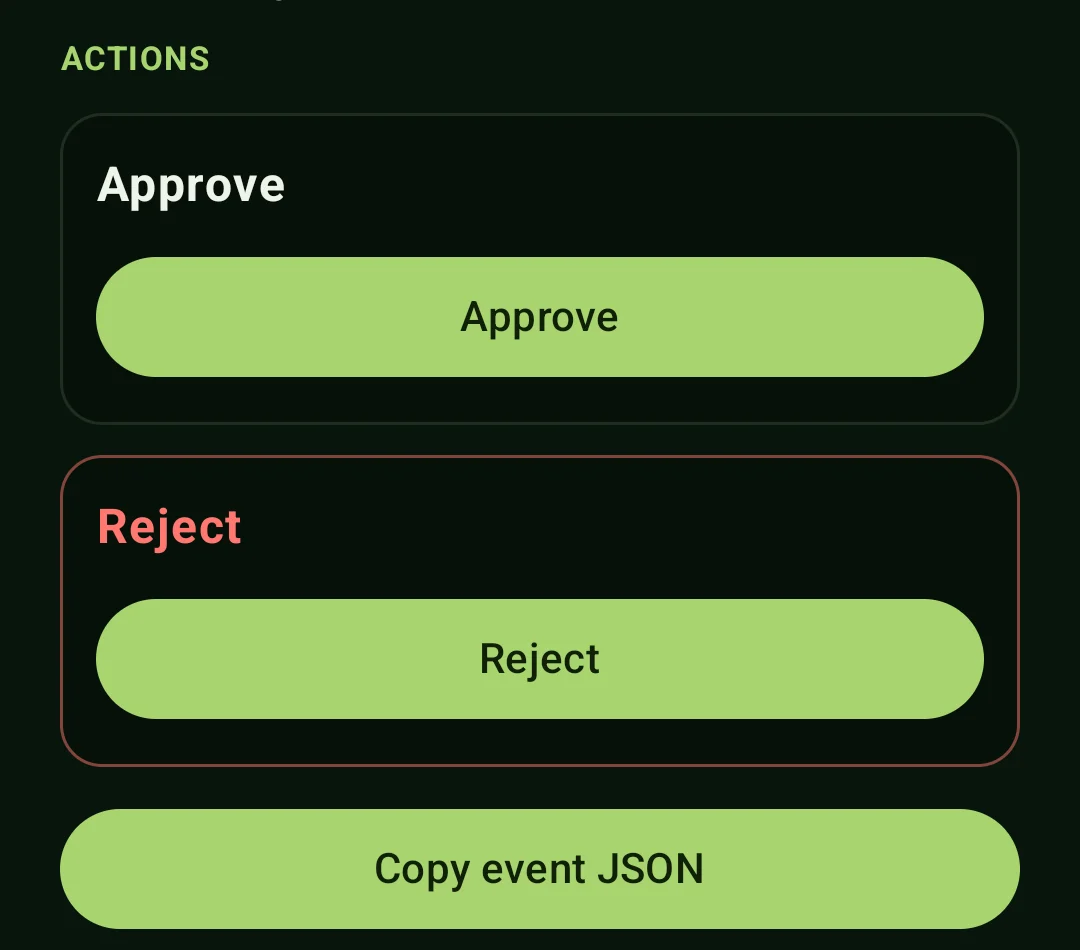
When Android submits an answer, it sends the event ID, action ID, response ID, and typed values. The server reloads the stored event and checks the original action definition. It also confirms that this installation received the event and that the action has not expired.
event, err := store.EventByID(ctx, eventID)
if err != nil {
    return err
}

_, recipient, err := store.IsEventRecipient(ctx, event.ID, installationID)
if err != nil || !recipient {
    return errForbidden
}

action, err := findStoredAction(event.Actions, request.ActionID)
if err != nil {
    return err
}
values, err := validateResponseValues(action, request.Values)
if err != nil {
    return err
}

response, duplicate, err := store.CreateActionResponse(ctx, event, action, values)
if err == nil && !duplicate {
    responseBroker.Publish(response)
}
The response ID is an idempotency key, so a network timeout cannot turn one tap into two answers. One action ID can succeed once per phone. If an action closes the event, later actions are rejected on the server even if an old client still shows the buttons.
Responses have their own sequence and replayable feed. Only the publisher that created the event can read them. Pushify does not call a URL from the event, execute an action label, or accept a command string from the phone.
For automation, a separate operator maps a few trusted action IDs to fixed operations. Arbitrary service names, paths, URLs, and commands are rejected. If an operation is not on that short list, I still need a terminal. I am fine with that.
Android can answer while the network is gone
The Android app keeps events in a private SQLite inbox. I can filter by channel or severity, inspect the attached JSON, open an HTTPS link, and see the state of an action response.
The app creates a response ID before trying the network. WorkManager waits for connectivity and uses exponential backoff for temporary failures:
val responseID = UUID.randomUUID().toString().replace("-", "")

val request = OneTimeWorkRequestBuilder<ActionResponseWorker>()
    .setInputData(responseData(eventID, action.id, responseID, values))
    .setConstraints(
        Constraints.Builder()
            .setRequiredNetworkType(NetworkType.CONNECTED)
            .build()
    )
    .setBackoffCriteria(BackoffPolicy.EXPONENTIAL, Duration.ofSeconds(10))
    .build()

WorkManager.getInstance(context).enqueueUniqueWork(
    "pushify-response-$responseID",
    ExistingWorkPolicy.KEEP,
    request,
)
Connection failures, rate limits, and server errors are retried. An ordinary client error is recorded as a permanent failure instead of looping forever. The app also discards an already expired message at receipt time rather than adding stale work to the inbox.
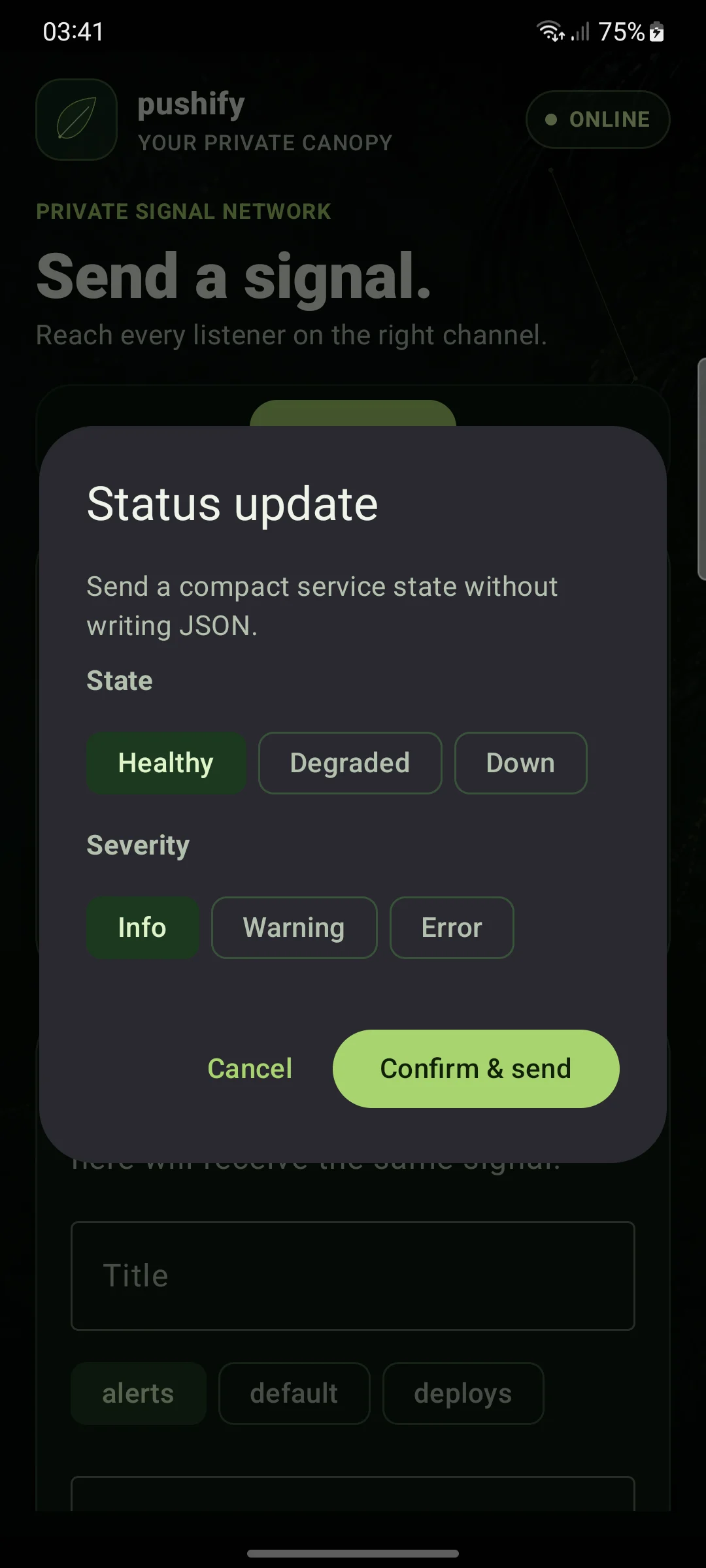
Presets came later, after I accepted that a flexible send form is still a lousy interface for a message I use all the time. A preset can expose native fields and place their values into the event. The substitution keeps the JSON type, so a number stays a number:
{
  "title": "Running late",
  "body": "About {{minutes}} minutes late.",
  "data": {
    "minutes": { "$field": "minutes" }
  }
}
Personal presets stay on the phone. Favourites can become Android launcher shortcuts. Sending “running late” now takes a couple of taps instead of an argument with my own JSON form.
Credentials have small jobs
Normal integrations do not use an unrestricted owner credential. They get named credentials with a permission and exact channel and event-type scopes.
The configuration points to the environment variable that contains the token. The token itself does not belong in the file:
{
  "name": "deploy-publisher",
  "token_env": "DEPLOY_PUBLISHER_TOKEN",
  "permissions": ["publish"],
  "channels": ["deploys"],
  "types": ["deploy.started", "deploy.completed", "deploy.failed"]
}
The server records the credential name as the event source. It ignores any attempt by that sender to claim another source in its JSON.
Android enrollment exchanges a shared enrollment credential for a token tied to that installation. Pushify stores only a SHA-256 hash of the installation token. The plain token is returned to the phone when it enrolls and is not kept in the database.
The HTTP layer applies body limits, rejects unknown JSON fields, limits requests before and after authentication, and caps concurrent streams. It trusts forwarded client addresses only from configured proxies. Logs contain principal names and request results, not bearer tokens or message bodies.
There is one more limit that happens earlier than I first expected. Before storing an event, Pushify builds and measures the complete Firebase data envelope using a worst-case sequence number. An event that cannot fit through FCM is rejected before it enters durable history. I did not want SQLite to contain events that Android could never receive.
A backup has to preserve behavior
Pushify uses SQLite’s online backup API, so a backup can be taken while the service is running. The backup is written to a temporary file, checked, given restrictive permissions, and renamed into place.
Restore is more cautious. It refuses to replace a database while the service holds the runtime lock, verifies the candidate, saves the current database, moves aside any WAL files, and atomically installs the replacement.
The test does not stop at PRAGMA quick_check. It restores devices, events, recipients, delivery records, responses, and deduplication records. Then it sends an event with a dedupe key from before the backup and checks that Pushify returns the original event. The restored database needs to behave like Pushify, not merely resemble a valid SQLite file.
If it outgrows one process
The current shape is one API instance, SQLite for durable state, and in-process brokers for live delivery. Reconnecting clients recover from the database, so restarting the live broker does not erase the event stream.
The VPS can be resized without changing that topology. If traffic or availability requirements make several API instances worthwhile, the store and broker interfaces already separate those responsibilities. SQLite and the in-process broker can then move to shared services while the API runs as multiple replicas behind the existing ingress path.
Pushify ended up larger than the webhook I first pictured, but the model is still simple enough to explain. A sender creates an event once. Consumers may disappear and catch up later. If an event asks a question, the answer is constrained, stored, and safe to retry.
Most of the time, that means I can deal with an alert from the notification and leave my laptop where it is. That was the point.